Theme Options
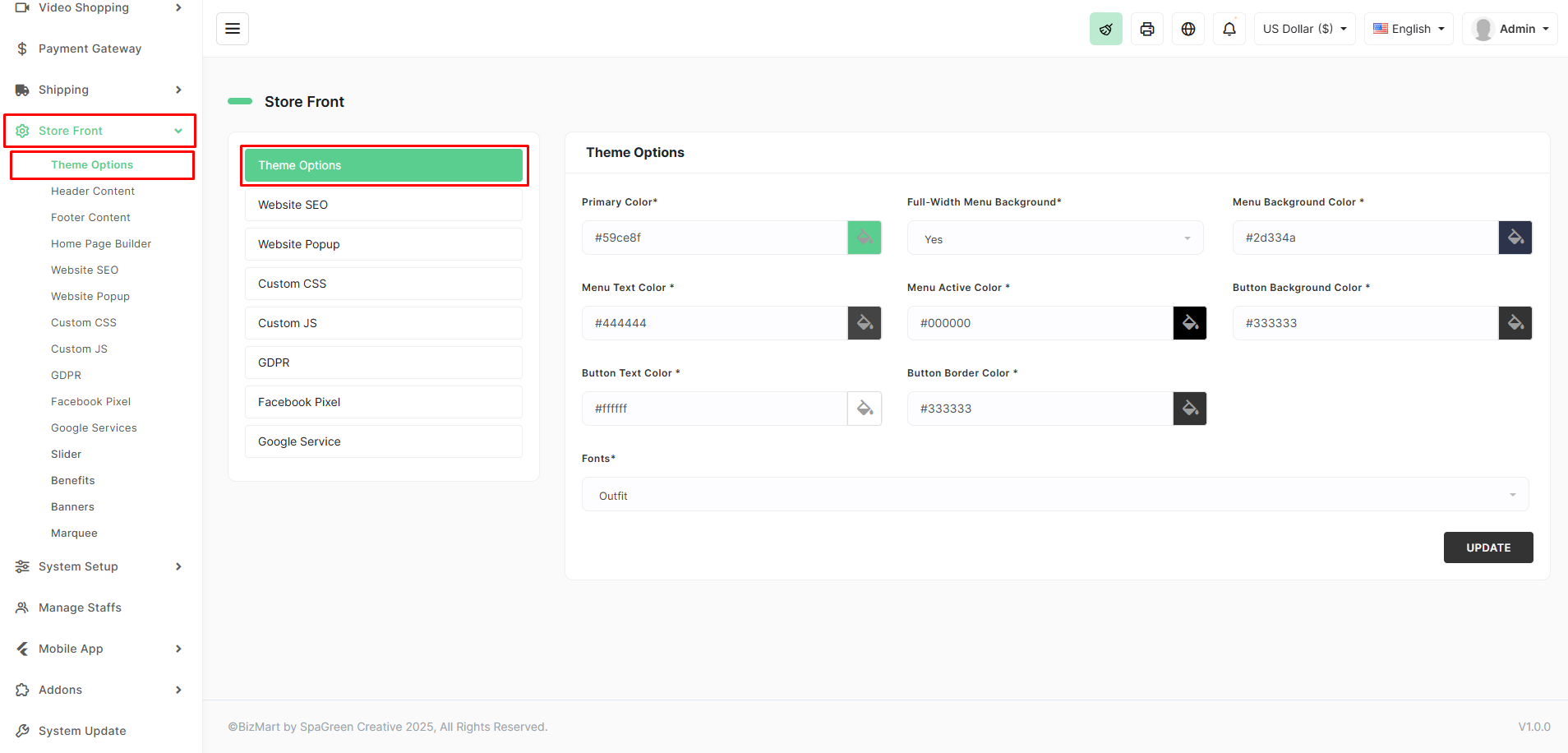
The Theme Options section lets you fully customize the visual appearance of your BizMart storefront without touching any code. You can change colors, fonts, menu styles, and button designs to match your brand identity.
Location
Store Front → Theme Options
Available Settings
| Setting | Description | Example / Notes |
|---|---|---|
| Primary Color | Main brand color used across the site (buttons, links, highlights) | #58ce8f (green in screenshot) |
| Full-Width Menu Background | Toggle to make the top navigation menu span full width | Yes / No |
| Menu Background Color | Background color of the navigation menu | #2d334a |
| Menu Text Color | Color of menu item text | #444444 |
| Menu Active Color | Color of the currently active/hovered menu item | #000000 |
| Button Background Color | Background color for all primary buttons (Add to Cart, Checkout, etc.) | #333333 |
| Button Text Color | Text color inside buttons | #ffffff (white) |
| Button Border Color | Border color for buttons (set to same as background for no visible border) | #333333 |
| Fonts | Choose Google Font family for headings and body text | Outfit, Roboto, Poppins, Lato, etc. |
How to Customize Your Theme
- Navigate to Store Front → Theme Options.
- Click the color boxes to open the color picker or enter hex codes directly.
- Toggle Full-Width Menu Background as needed.
- Select your preferred Font from the dropdown (loads Google Fonts automatically).
- Preview changes instantly in the browser.
- Click UPDATE to save your settings.
Changes take effect immediately across the entire storefront — no cache clearing required in most cases.
Pro Tips
- Use a color picker tool (like coolors.co or browser dev tools) to extract exact colors from your logo.
- Keep Button Text Color high-contrast against Button Background Color for accessibility.
- Choose modern, clean Google Fonts like Outfit, Inter, Manrope, or Nunito for best results.
- For a transparent menu on homepage hero sections, set Menu Background Color to a semi-transparent value (e.g.,
#2d334add).
Your store’s look and feel is now 100% under your control — all from one simple, user-friendly panel!