Preference Settings
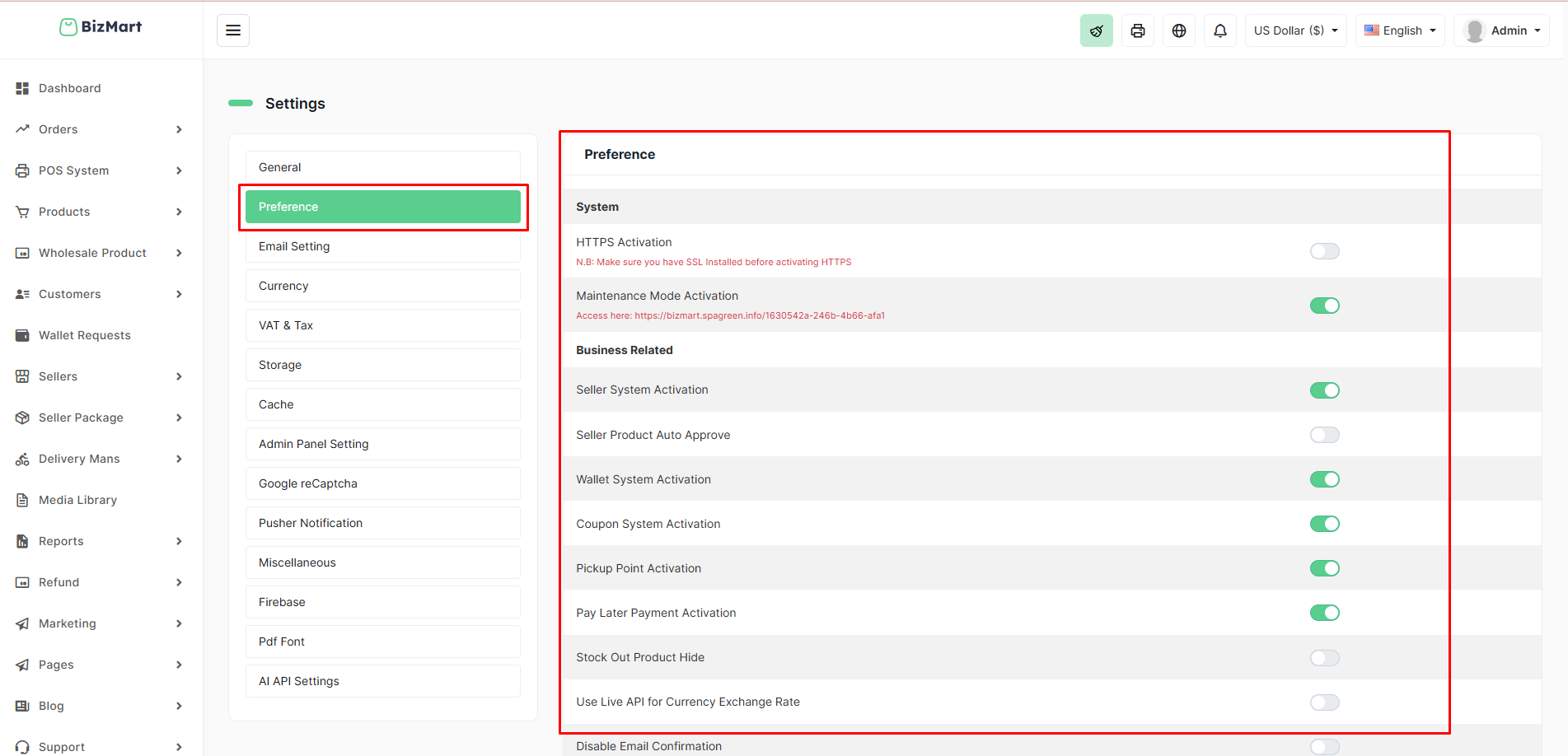
The Preference section allows you to enable or disable major features and system behaviors of BizMart with a single toggle. This is where you control multi-vendor functionality, wallet, coupons, maintenance mode, and more.
Location
System Setup → Preference
Available Options
| Category | Setting | Description | Recommended For |
|---|---|---|---|
| System | HTTPS Activation | Forces all traffic to use HTTPS (requires valid SSL certificate) | All live stores (security) |
| Maintenance Mode Activation | Takes the entire storefront offline (shows maintenance page) | During updates or major changes | |
| Business Related | Seller System Activation | Enables multi-vendor marketplace features | Marketplace stores |
| Seller Product Auto Approve | New seller products go live instantly (no admin approval needed) | Trusted sellers only | |
| Wallet System Activation | Enables customer wallet for refunds, cashback, and wallet payments | High-repeat customer stores | |
| Coupon System Activation | Allows creation and use of discount coupons | All stores | |
| Pickup Point Activation | Customers can choose local pickup locations during checkout | Stores with physical locations | |
| Pay Later Payment Activation | Allows "Cash on Delivery" or manual offline payment methods | Most stores in developing markets | |
| Stock Out Product Hide | Automatically hides products with zero stock | Cleaner storefront | |
| Use Live API for Currency Exchange Rate | Pulls real-time exchange rates from external API (instead of manual rates) | Multi-currency stores | |
| Disable Email Confirmation | Skips email verification during registration | Faster onboarding (less secure) |
How to Configure
- Go to System Setup → Preference.
- Toggle any feature ON (green) or OFF (gray) as needed.
- Changes take effect immediately — no save button required.
Recommended Default Settings (Most Stores)
| Setting | Recommended |
|---|---|
| HTTPS Activation | ON |
| Maintenance Mode | OFF |
| Seller System Activation | ON (if marketplace) / OFF (if single store) |
| Seller Product Auto Approve | OFF (manual approval safer) |
| Wallet System Activation | ON |
| Coupon System Activation | ON |
| Pickup Point Activation | ON/OFF based on your logistics |
| Pay Later Payment Activation | ON |
| Stock Out Product Hide | ON |
| Use Live API for Currency Exchange | ON (if multi-currency) |
Pro Tips
- Always enable HTTPS on live sites.
- Turn on Maintenance Mode before major updates.
- Keep Seller Product Auto Approve = OFF to maintain quality control.
- Enable Stock Out Product Hide for a cleaner, more professional look.
One-click control over your entire store’s functionality — simple, powerful, and instant!