Payment Gateways
The Payment Gateways section in BizMart allows you to configure and enable various online payment methods to accept payments from customers. BizMart supports a wide range of popular gateways for global and regional coverage.
Location
Payment Gateway (in the left navigation menu)
Available Payment Methods
| Gateway | Description | Configuration Required |
|---|---|---|
| PayPal | Global payment processor supporting cards, PayPal balance, and Pay Later | Client ID |
| Stripe | Popular for cards, Apple Pay, Google Pay; supports subscriptions | Publishable & Secret Keys |
| SSLCommerz | Bangladesh-focused gateway for local cards, mobile banking, and bank transfers | Store ID & Password |
| Paytm | India-specific for UPI, wallets, and cards | Merchant Key & ID |
| JazzCash | Pakistan's mobile wallet and banking integration | Merchant ID & Password |
| Razorpay | India gateway for cards, UPI, wallets, and EMI options | Key ID & Secret |
| Mollie | European gateway for iDEAL, SEPA, cards, and more | API Key |
| Paystack | Africa-focused for cards, bank transfers, and USSD | Secret Key |
| Flutterwave | Pan-African gateway with mobile money and cards | Public & Secret Keys |
| Mercado Pago | Latin America for cards, cash, and installments | Access Token |
| Midtrans | Indonesia gateway for cards, e-wallets, and bank transfers | Merchant ID & Key |
| Telr | Middle East gateway for cards, iDEAL, and KNET | Merchant ID |
| Google Pay | Contactless payments via Google Wallet (requires integration with another gateway) | N/A (addon) |
| Amar Pay | Bangladesh mobile financial service integration | API Credentials |
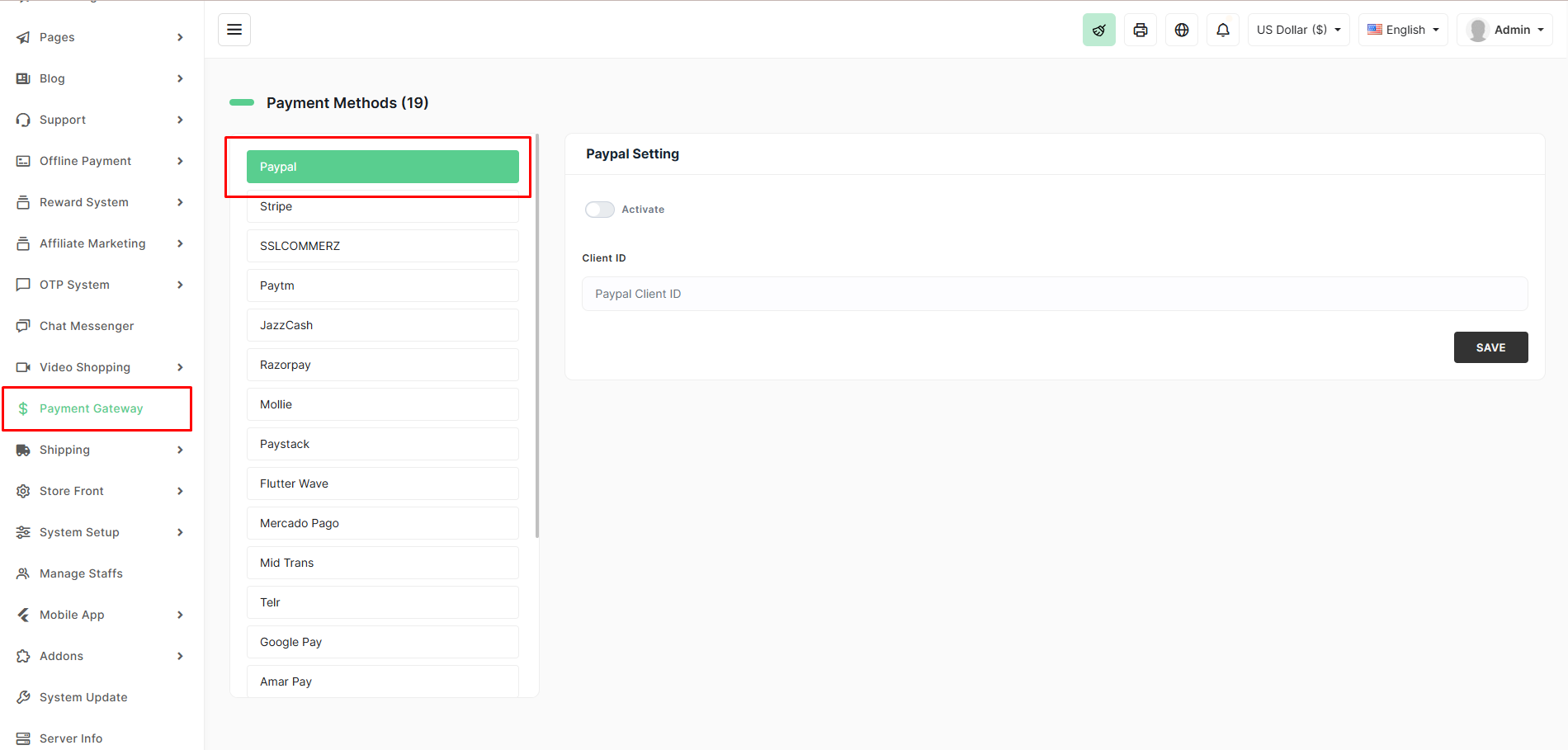
General Setup Steps
- Navigate to Payment Gateway from the left sidebar.
- Click on the desired gateway (e.g., Stripe, PayPal).
- Toggle Activate to enable it.
- Enter the required credentials (API keys, IDs, etc.) from your gateway dashboard.
- Click SAVE.
Enabled gateways will appear as options during customer checkout. You can enable multiple gateways for flexibility.
Tips
- Start with 2–3 gateways based on your target audience (e.g., PayPal + Stripe for international, SSLCommerz for Bangladesh).
- Test payments in sandbox/test mode before going live.
- Monitor transaction logs in the Orders section for any issues.
- Some gateways may require additional setup like webhooks for instant order updates (configured automatically in BizMart where supported).
For detailed configuration of a specific gateway, refer to its dedicated documentation page.