General Settings
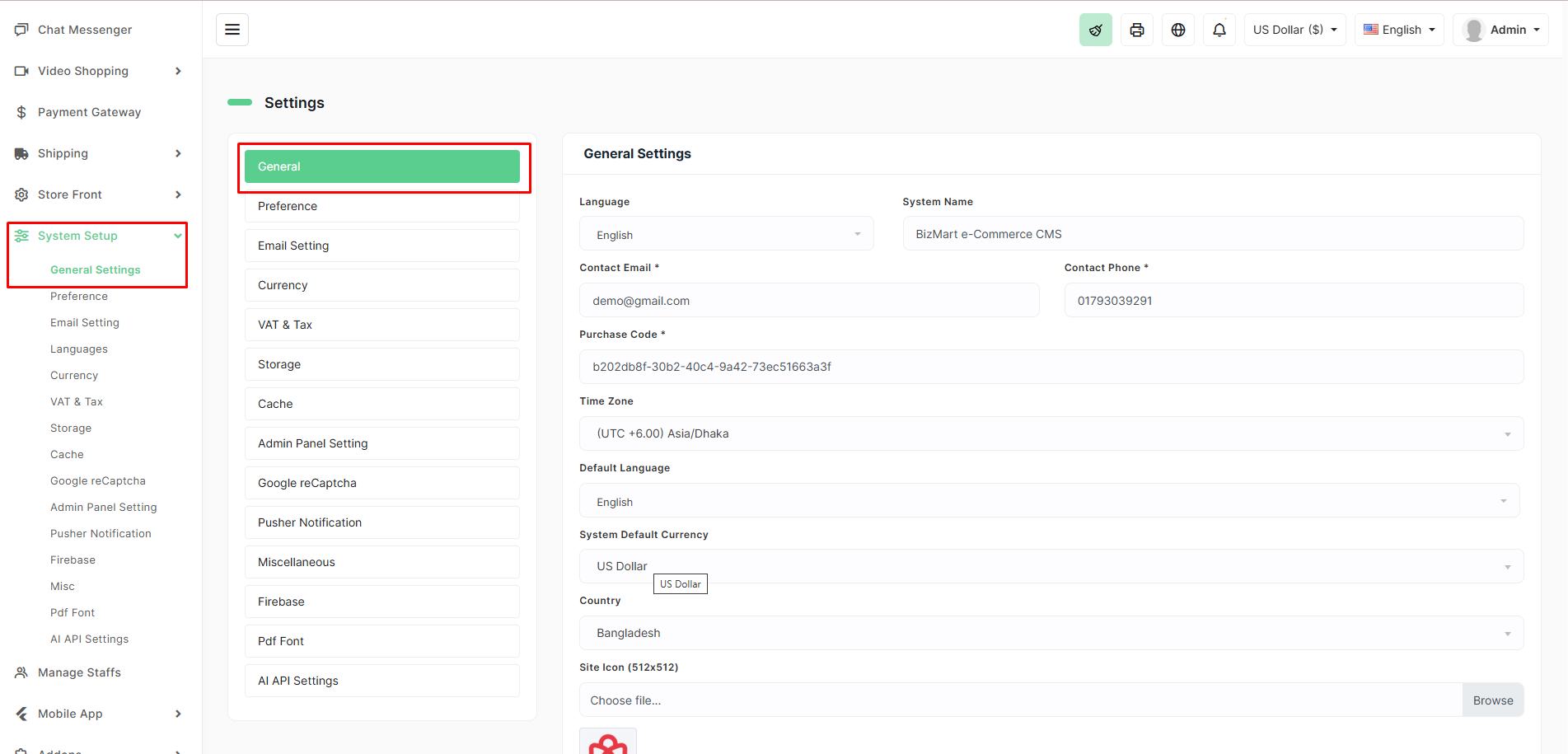
The General Settings page is the central place to configure core information about your BizMart store. These settings affect store name, contact details, language, currency, timezone, and more.
Location
System Setup → General Settings
Key Configuration Fields
| Field | Description | Recommended / Notes |
|---|---|---|
| Language | Admin panel interface language | Usually English |
| System Name | Official name of your store (appears in emails, invoices, etc.) | e.g., BizMart, FashionHub, TechShop BD |
| Contact Email* | Main email for customer inquiries & system notifications | Use a professional email (e.g., info@yourstore.com) |
| Contact Phone* | Primary phone number shown in header, footer, and contact page | Include country code if international |
| Purchase Code* | Your Envato/Codecanyon purchase code (required for updates & support) | Keep this private! |
| Time Zone | Server timezone (affects order timestamps, flash sales, etc.) | (UTC +06:00) Asia/Dhaka for Bangladesh |
| Default Language | Frontend default language for new visitors | Usually English or your main language |
| System Default Currency | Base currency for all pricing and transactions | e.g., US Dollar, Bangladeshi Taka (BDT) |
| Country | Primary country of operation (affects shipping, tax, payment gateways) | e.g., Bangladesh, United States |
| Site Icon (Favicon) | Small icon shown in browser tab (512×512 px recommended) | Upload .ico or .png |
How to Update
- Go to System Setup → General Settings.
- Fill or update all required fields (marked with *).
- Upload your Site Icon (favicon).
- Click UPDATE at the bottom.
Changes take effect immediately across the entire system.
Pro Tips
- Use a real, monitored email for Contact Email — customers will reach you here.
- Never share your Purchase Code publicly.
- Set the correct Time Zone — critical for flash sales and scheduled campaigns.
- Use a high-quality 512×512 px image for the favicon (it will be auto-converted).
- Keep System Name consistent across all branding.
These settings are foundational — configure them correctly once, and your entire store runs smoothly!