Configure email settings
This section describes how to configure email settings for the BizMart e-Commerce CMS, which supports SMTP, SendGrid, MailGun, and SendMail. To configure the SMTP system, one needs to create an email from the server panel, then go to Admin Panel -> System Setup -> Email settings and select SMTP mail driver. It is noted that this email setting is crucial for email verification and sending news to subscribers.
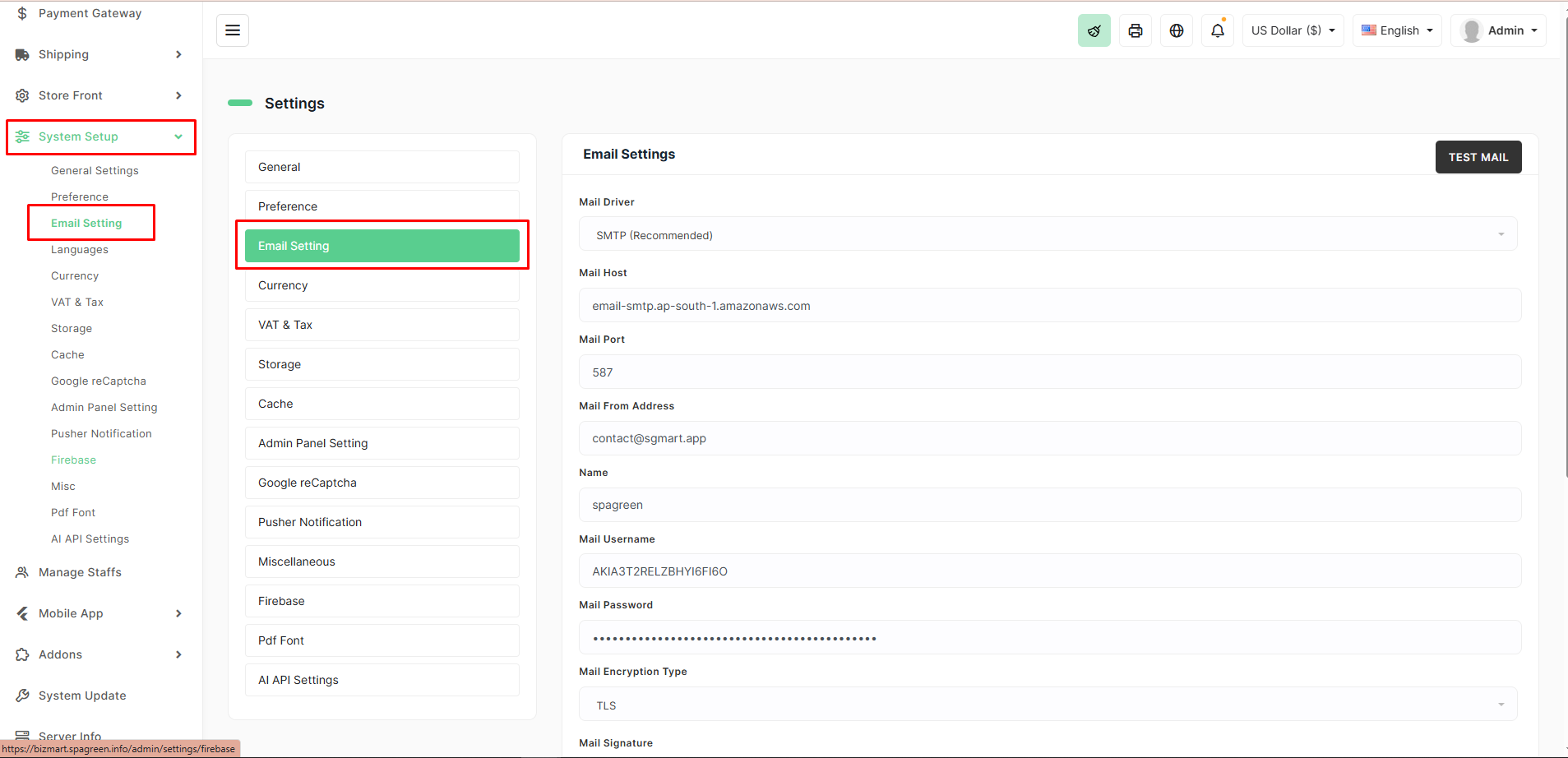
The form fields to fill include: * MAIL_DRIVER: Email driver, default is smtp. * MAIL_HOST: Email host, e.g., smtp.mailtrap.io. * MAIL_PORT: Outgoing email port, e.g., 2525 or 465. * MAIL_USERNAME: Outgoing email username. * MAIL_PASSWORD: Outgoing email password. * MAIL_ENCRYPTION: Default is null, other options are tls and ssl. * MAIL_FROM_ADDRESS: The email address that sends emails (your company address). * MAIL_FROM_NAME: Your company name that appears on emails.
The page also mentions that SendGrid and MailGun mail drivers can be configured in the same way.